Abteilung Umweltchemie

Den Schadstoffen auf der Spur

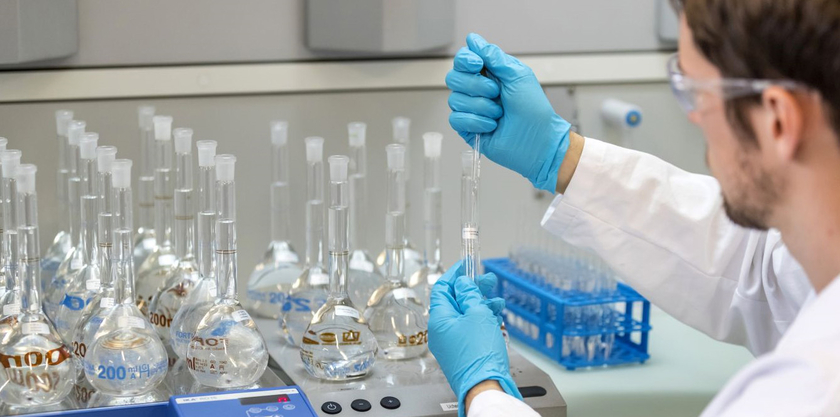
Unser Forschungsteam untersucht Vorkommen, Verteilung und Verbleib von organischen Schadstoffen in der aquatischen Umwelt. Der Fokus liegt auf den Stoffflüssen aus den Siedlungsgebieten sowie der Landwirtschaft. Zentrale Werkzeuge dabei sind die Spurenanalytik, Feld- und Laborstudien sowie die Modellierung.

Erfahren Sie mehr

Aktuelles

23. April 2026 –

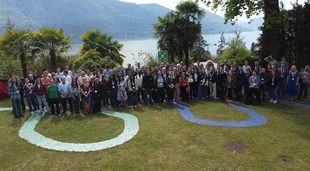
Die Konferenz Nontarget2026 die vom 12. bis 17. April in der malerischen Umgebung von Ascona auf dem Monte Verita in der Schweiz stattfand, brachte erfolgreich eine internationale Gemeinschaft von Wissenschaftlerinnen und...

Die Konferenz Nontarget2026 die vom 12. bis 17. April in der malerischen Umgebung von Ascona auf dem Monte Verita in der Schweiz stattfand, brachte erfolgreich eine internationale Gemeinschaft von Wissenschaftlerinnen und Wissenschaftlern zusammen, um das Gebiet der Umweltüberwachung weiter voranzubringen.

Weiterlesen
13. März 2026 –

Isotopenmarker zum Aufschlüsseln von Nahrungsnetzen und deren Veränderung nutzen sowie Wege und Anreicherung von Schadstoffen in Wasserorganismen verfolgen – gleich für zwei spannende und thematisch sehr aktuelle Doktorarbeiten...

Isotopenmarker zum Aufschlüsseln von Nahrungsnetzen und deren Veränderung nutzen sowie Wege und Anreicherung von Schadstoffen in Wasserorganismen verfolgen – gleich für zwei spannende und thematisch sehr aktuelle Doktorarbeiten wurde 2025 der Otto-Jaag-Gewässerschutzpreis verliehen.

Weiterlesen
26. Februar 2026 –

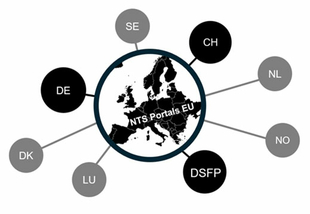
Bei einem kürzlich stattgefundenen Workshop mit 40 Expertinnen und Experten, der gemeinsam von Anna-Lena Kronsbein, Jan Koschorreck vom deutschen Umweltbundesamt sowie von Teofana Chonova, Heinz Singer und Juliane Hollender von...

Bei einem kürzlich stattgefundenen Workshop mit 40 Expertinnen und Experten, der gemeinsam von Anna-Lena Kronsbein, Jan Koschorreck vom deutschen Umweltbundesamt sowie von Teofana Chonova, Heinz Singer und Juliane Hollender von der Eawag organisiert wurde, wurden zwei Tage lang die Interoperabilität und die Zukunft von Non-Target Screening-Portalen für hoch auflösende Massenspektrometrie-Daten diskutiert.

Weiterlesen
23. Januar 2026 –

Zum WEF 2026 präsentierte der ETH-Bereich Highlights aus der Forschung, die zeigen, wie künstliche Intelligenz den Weg zu mehr Nachhaltigkeit ebnet. Entscheidungsträgerinnen und -träger aus Politik und Wirtschaft informierten sich...

Zum WEF 2026 präsentierte der ETH-Bereich Highlights aus der Forschung, die zeigen, wie künstliche Intelligenz den Weg zu mehr Nachhaltigkeit ebnet. Entscheidungsträgerinnen und -träger aus Politik und Wirtschaft informierten sich über praxisnahe KI-Anwendungen für Umwelt und Gesellschaft.

Weiterlesen

Informationen für potenzielle Bewerber SNF Ambizione / Starting grant Fellowship

[ENG]

The Environmental Chemistry Department is fortunate to have externally funded fellows contributing to our research and teaching environment. If you consider applying for an externally funded fellowship in our Department, please check your eligibility under www.snf.ch/en/funding/careers/Pages/default.aspx and contact a group leader whose research interests are close to yours. To ensure that incoming fellows fit our research environment and can be accommodated appropriately, and to do the necessary paperwork, sufficient time is required. If you want to apply for Ambizione/SNSF starting grant with Uchem as a host, please contact the Group Leader of your choice at least 3 months in advance of the submission deadline. Selected candidates will be invited to give a talk at our Department and discuss their research plans with us. Your formal expression of interest should come as a single PDF file including a complete CV, a motivation letter detailing why our Department is the right place for your research, an outline of the planned project (max. 2 pages), and the names and contact details of two references.

Letzte Publikationen

Extbase Variable Dump
array(2 items)
   publications => '36410,36440,35695,35908' (23 chars)
   libraryUrl => '' (0 chars)
Extbase Variable Dump
array(4 items)
   0 => Snowflake\Publications\Domain\Model\Publicationprototypepersistent entity (uid=36410, pid=124)
      originalId => protected36410 (integer)
      authors => protected'Rougé, V.; Dax, A.; Köster, O.; von Gunten, U.; Jansse
         n, E. M. -L.
' (103 chars) title => protected'Degradation of toxins and metabolites of cyanobacteria and micropollutants d
         uring biological sand filtration
' (108 chars) journal => protected'Environmental Science and Technology' (36 chars) year => protected2026 (integer) volume => protected60 (integer) issue => protected'12' (2 chars) startpage => protected'9647' (4 chars) otherpage => protected'9659' (4 chars) categories => protected'cyanotoxin; drinking water treatment; enzymes; kinetic; biodegradation; biot
         ransformation products
' (98 chars) description => protected'Cyanobacteria produce complex mixtures of secondary metabolites (cyano-metab
         olites), some of which are toxic and pose a growing concern for water utilit
         ies. While physical treatments such as filtration can efficiently remove cel
         ls, their lysis can release dissolved cyano-metabolites. This study investig
         ated the efficiency of laboratory-scale sand filtration to abate 19 cyano-me
         tabolites representing various structural classes. Furthermore, abatement of
          cyano-metabolites in a full-scale sand filtration is presented. Most cyano-
         metabolites showed abatement similar to or higher than the biodegradable ben
         chmark micropollutants atenolol, paracetamol, and valsartan. Among cyano-met
         abolites, anabaenopeptins and cyanopeptolins had the highest abatement, whil
         e cyclamides and microcystin-LR had the lowest abatement. Abiotic controls a
         nd formation trends of 10 identified biotransformation products demonstrated
          that biodegradation played a major role in their removal. Laboratory-scale
         sand filters showed a sharp increase in biodegradation efficiency within day
         s due to their adaptation to cyano-metabolites. Increasing the contact time
         and temperature both enhanced the abatement of most compounds, which could b
         e kinetically modeled. High cyano-metabolite concentrations suppressed their
          own relative abatement, possibly due to metabolic enzyme inhibition or satu
         ration. These findings suggest that sand filtration can serve as a dual-barr
         ier against cyano-metabolites, including particle removal and biodegradation
         . However, biodegradation will be affected by the temperature and cyano-meta
         bolite intake dynamics.
' (1619 chars) serialnumber => protected'0013-936X' (9 chars) doi => protected'10.1021/acs.est.5c16532' (23 chars) uid => protected36410 (integer) _localizedUid => protected36410 (integer)modified _languageUid => protectedNULL _versionedUid => protected36410 (integer)modified pid => protected124 (integer)
1 => Snowflake\Publications\Domain\Model\Publicationprototypepersistent entity (uid=36440, pid=124) originalId => protected36440 (integer) authors => protected'Wehrli, M.; Meyer, A.; Souza da Silva, É.; van Loon, S.
         ; van Hall, B. G.; van Gestel, C. A. M.; Natal-da-L
         uz, T.; Döring, M. V. R.; Feldhaar, H.; Mair,&nbsp
         ;M.; Jordan, D.; Langer, M.
' (265 chars) title => protected'COLLEMBOT: AI-based counting of Collembola for OECD 232 Tests' (61 chars) journal => protected'Environmental Toxicology and Chemistry' (38 chars) year => protected2026 (integer) volume => protected0 (integer) issue => protected'' (0 chars) startpage => protected'' (0 chars) otherpage => protected'' (0 chars) categories => protected'soil ecotoxicology; Folsomia candida; automated counting; computer vision; r
         isk assessment
' (90 chars) description => protected'Ecotoxicological tests with soil organisms, such as the collembola <em>Folso
         mia candida</em>, are essential for assessing chemical risks in terrestrial
         ecosystems. However, the current Organization for Economic Co-operation and
         Development (OECD) 232 reproduction tests rely on manual counting of juvenil
         e and adult Collembola, a process that is costly, labor-intensive, time-cons
         uming and prone to operator bias. These limitations restrict data availabili
         ty and hinder robust risk assessments. We therefore developed COLLEMBOT, an
         automated counting tool based on a YOLOv11 convolutional neural network, des
         igned to integrate seamlessly into OECD workflows without protocol modificat
         ions. The model was trained on high-resolution images (<em>n = 3207</em>
         ) from multiple laboratories and validated using 22 independent datasets (<e
         m>n = 1704 images</em>) from Amsterdam (Netherlands), Basel (Switzerland
         ), Bayreuth (Germany), Coimbra (Portugal) and Aarhus (Denmark). Datasets con
         sisted of relevant standard soils (OECD artificial soils with 2.5%, 5% and 1
         0% sphagnum peat; LUFA 2.2) and the springtail <em>Folsomia candida.</em> Au
         tomated counts showed strong agreement with manual counts (<em>R² =</em> 0.
         79–0.99). Dose-response curves derived from automated and manual counts st
         rongly overlapped and effect concentrations (EC10 and EC50) differed minimal
         ly (Median %Δ 6.2 ± 23 and EC10–EC90 <em>R<sup>2</sup> ≥</em> 0.977),
         remaining within acceptable limits for regulatory risk assessment and confir
         ming reliability. Time efficiency improved significantly: a test with approx
         imately 300 images and up to 1,500 individuals per image was processed in le
         ss than 3 hr, compared to approximately 137 hr needed for manual countin
         g, a reduction of approximately 97%. By reducing labor and improving reprodu
         cibility, COLLEMBOT enables broader hazard data generation for collembola, s
         upporting science-based chemical risk assessment. The code and workflow are
         publicly available to fa...
' (2051 chars) serialnumber => protected'0730-7268' (9 chars) doi => protected'10.1093/etojnl/vgag068' (22 chars) uid => protected36440 (integer) _localizedUid => protected36440 (integer)modified _languageUid => protectedNULL _versionedUid => protected36440 (integer)modified pid => protected124 (integer)
2 => Snowflake\Publications\Domain\Model\Publicationprototypepersistent entity (uid=35695, pid=124) originalId => protected35695 (integer) authors => protected'Bernet,&nbsp;N.&nbsp;M.; Soldini,&nbsp;C.; Felder,&nbsp;T.&nbsp;M.&nbsp;O.;
         Lapčíková,&nbsp;K.; Neubauer,&nbsp;C.; Queen,&nbsp;W.&nbsp;L.; Kaegi,&nbs
         p;R.; Tamburini,&nbsp;F.; Hofstetter,&nbsp;T.&nbsp;B.
' (205 chars) title => protected'Oxygen isotope analyses of phosphate and organophosphorus compounds by elect
         rospray ionization orbitrap mass spectrometry
' (121 chars) journal => protected'Analytical Chemistry' (20 chars) year => protected2025 (integer) volume => protected97 (integer) issue => protected'41' (2 chars) startpage => protected'22777' (5 chars) otherpage => protected'22786' (5 chars) categories => protected'' (0 chars) description => protected'Orbitrap mass spectrometry with electrospray ionization (ESI-Orbitrap MS) en
         ables<sup>18</sup>O/<sup>16</sup>O ratio measurements in phosphate and organ
         ophosphorus compounds, which offers promising avenues for the study of metab
         olic, biogeochemical, and environmental processes. While the instrumental fe
         asibility of such<sup>18</sup>O/<sup>16</sup>O ratio measurements has been s
         hown, the applicability of such analyses in aqueous matrices on multipurpose
          mass spectrometers remains unaddressed. Here, we (i) evaluated the interpla
         y between instrument parameters and the long-term accuracy and precision of
         ESI-Orbitrap MS for the determination of δ<sup>18</sup>O(PO<sub>4</sub>) fr
         om H<sub>2</sub>PO<sub>4</sub><sup>–</sup>vs PO<sub>3</sub><sup>–</sup>f
         ragments of phosphate, (ii) identified properties of methanolic sample solut
         ions that are critical for accurate and precise measurements, and (iii) prop
         ose a sample purification procedure for the elimination of matrix-based inte
         rferences. In 10 measurement campaigns over two years, we observed a long-te
         rm reproducibility of δ<sup>18</sup>O(PO<sub>4</sub>) within ±2.8‰. Resu
         lts of in-source fragmentation experiments of H<sub>2</sub>PO<sub>4</sub><su
         p>–</sup>to PO<sub>3</sub><sup>–</sup>show excellent agreement of δ<sup
         >18</sup>O and offer promising opportunities to probe for<sup>18</sup>O/<sup
         >16</sup>O ratios in organophosphorus compounds. By investigating the effect
          of the aqueous matrix and interfering anions on<sup>18</sup>O/<sup>16</sup>
         O ratio measurements, we found that a water content exceeding 50 vol % and t
         he presence of oxyanions such as nitrate and sulfate limit measurement accur
         acy due to interferences of matrix constituents in the ESI source. To overco
         me these challenges, we evaluated selective phosphate extraction with a zirc
         onium-based metal–organic framework (MOF) as sorbent. The resulting purifi
         cation procedure allowed for successful extraction and recovery of phosphate
          from nitrate- and sulfa...
' (2161 chars) serialnumber => protected'0003-2700' (9 chars) doi => protected'10.1021/acs.analchem.5c04367' (28 chars) uid => protected35695 (integer) _localizedUid => protected35695 (integer)modified _languageUid => protectedNULL _versionedUid => protected35695 (integer)modified pid => protected124 (integer)
3 => Snowflake\Publications\Domain\Model\Publicationprototypepersistent entity (uid=35908, pid=124) originalId => protected35908 (integer) authors => protected'Petrus,&nbsp;E.; Hunkeler,&nbsp;L.&nbsp;A.; Reiher,&nbsp;M.; von Gunten,&nbs
         p;U.; Hofstetter,&nbsp;T.&nbsp;B.
' (109 chars) title => protected'Automated reaction exploration of ozonation processes for model olefins in w
         ater
' (80 chars) journal => protected'Environmental Science and Technology' (36 chars) year => protected2025 (integer) volume => protected59 (integer) issue => protected'49' (2 chars) startpage => protected'26806' (5 chars) otherpage => protected'26818' (5 chars) categories => protected'water treatment; ozonation; chemical reaction network; quantum chemistry; hi
         gh-throughput computational chemistry; microkinetic modeling; reaction pathw
         ay identification
' (169 chars) description => protected'The comprehensive evaluation of pollutant abatement during chemical oxidatio
         n processes and the identification of potentially hazardous transformation p
         roducts are fundamental challenges in water and wastewater treatment. Here,
         we demonstrate how high-throughput computational chemistry enables the eluci
         dation of reaction pathways via automated, quantum-chemistry-based chemical
         reaction network (CRN) explorations. We evaluated the predictive capabilitie
         s of this computational approach using the Software for Chemical Interaction
          Networks (SCINE) for studying the reactions of ozone with two olefins, ethe
         ne and tetramethylethene, in aqueous solution. Following a benchmarking of t
         he quantum chemical methodology for structure optimization and energy calcul
         ations, we generated CRNs containing hundreds of compounds and thousands of
         reactions, identified reaction mechanisms, and evaluated product formation k
         inetics through microkinetic modeling. These CRN explorations led to the cor
         rect reproduction of experimental evidence for mechanisms and products of ol
         efin ozonolysis for reactions of ozone and ethene solely on the basis of def
         ining the reactants and their initial concentrations. The study of reactions
          of ozone and tetramethylethene also matched experimental data for the main
         products but revealed consequences of the limited exploration depth and shor
         tcomings of the implicit solvation model. We envision that CRN explorations
         not only offer novel means for predicting pollutant transformation pathways
         but also will support chemical analysis and the assessment of effects on hum
         an and environmental health.
' (1624 chars) serialnumber => protected'0013-936X' (9 chars) doi => protected'10.1021/acs.est.5c16167' (23 chars) uid => protected35908 (integer) _localizedUid => protected35908 (integer)modified _languageUid => protectedNULL _versionedUid => protected35908 (integer)modified pid => protected124 (integer)
Rougé, V.; Dax, A.; Köster, O.; von Gunten, U.; Janssen, E. M. -L. (2026) Degradation of toxins and metabolites of cyanobacteria and micropollutants during biological sand filtration, Environmental Science and Technology, 60(12), 9647-9659, doi:10.1021/acs.est.5c16532, Institutional Repository
Wehrli, M.; Meyer, A.; Souza da Silva, É.; van Loon, S.; van Hall, B. G.; van Gestel, C. A. M.; Natal-da-Luz, T.; Döring, M. V. R.; Feldhaar, H.; Mair, M.; Jordan, D.; Langer, M. (2026) COLLEMBOT: AI-based counting of Collembola for OECD 232 Tests, Environmental Toxicology and Chemistry, doi:10.1093/etojnl/vgag068, Institutional Repository
Bernet, N. M.; Soldini, C.; Felder, T. M. O.; Lapčíková, K.; Neubauer, C.; Queen, W. L.; Kaegi, R.; Tamburini, F.; Hofstetter, T. B. (2025) Oxygen isotope analyses of phosphate and organophosphorus compounds by electrospray ionization orbitrap mass spectrometry, Analytical Chemistry, 97(41), 22777-22786, doi:10.1021/acs.analchem.5c04367, Institutional Repository
Petrus, E.; Hunkeler, L. A.; Reiher, M.; von Gunten, U.; Hofstetter, T. B. (2025) Automated reaction exploration of ozonation processes for model olefins in water, Environmental Science and Technology, 59(49), 26806-26818, doi:10.1021/acs.est.5c16167, Institutional Repository

Veranstaltungen

29.06.​2026,
9:00 Uhr
Eawag Dübendorf

PEAK consolidation-level course V63/26